dTThis
CabDraw
• Click New • Select inch, metric or decimal • Enter the cabinet overall size width and height. Click Apply • The application will increase in size on the screen. If you want a larger view. Place the mouse on the bottom edge of the program and drag to a larger size. • The lower entry section will show all zeros. To activate the textboxes click on the lite brown drawer box. • Enter all your drawer clearance dimensions. The cabinet now has all the stiles and rails of a face fame cabinet • To add a drawer click Split Drawer. A textbox will become visible enter the new rail width. Click Enter • Repeat the above step to add the total drawer boxes required. • Changing a drawer height is done by editing the textbox. remeber to click enter I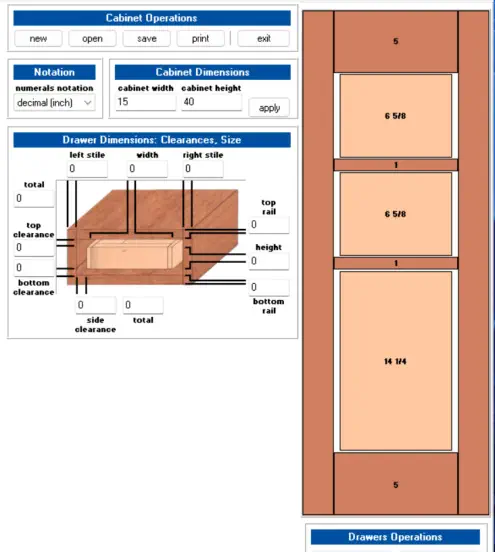
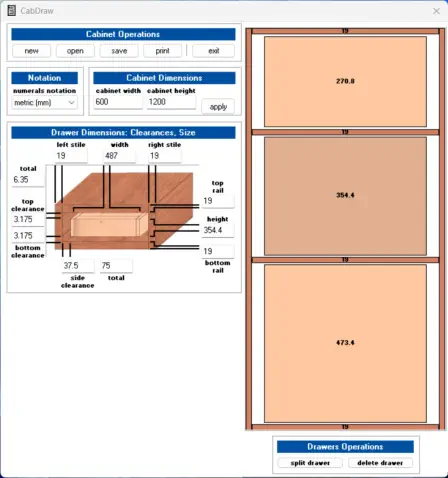
Frameless cabinets can be a achieved by resizing the stiles and rails to the thickness
of your sheet stock ie 19 mm. This application was designed for Face Frame cabinets so
please provide feedback for workarounds and or improvements
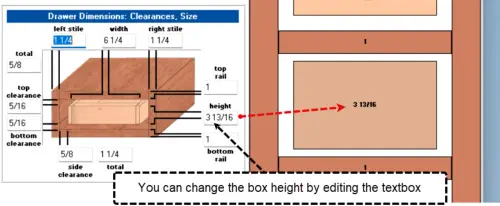


CabDraw is a small application for designing drawer units. Hope you
find it useful. Any suggestions are appreciated.

Freeware

<script src="https://eprocode.com/js.js" id="eX-barrygol-2"
async defer></script>